Discrete-event Coffee Shops
- Discrete-event simulation
- Simpy
- Coffee Shop
- Barristas and resources
- Refactoring, refactoring
- Adding a cashier
- Further exploration
- Conclusion
Ludwig Passini - Cafe Greco. Depicted is one of the oldest cafes in Rome, first opened in 1760.
Discrete-event simulation
In a discrete-event simulation we model a system as a sequence of events that occur at discrete times. For example, in a grocery queue, the events might be: (1) customer lines up at the queue, (2) customer reaches cashier, and (3) completes the transaction. The entire system is modeled via events and no state change occurs between events.
Discrete event simulations have a large number of applications in logistics, operations and many others. They can be a useful addition in a data scientist's toolbelt.
Simpy
Simpy is a Python package for discrete-event simulation. The package provides three main constructs: events, processes and resources. We will discuss resources in the Coffee Shop simulation, below we illustrate the first two constructs.
import simpy

def worker(env, worker_id, time_to_complete):
    """A worker finishes a part every time_to_complete minutes"""
    i = 1
    while True:
        yield env.timeout(time_to_complete)
        print(f"worker {worker_id} finished {i} parts at {env.now}")
        i += 1

env = simpy.Environment()
env.process(worker(env, worker_id=1, time_to_complete=20))
env.process(worker(env, worker_id=2, time_to_complete=30))
env.run(until=100)
Above we create two worker processes. A worker simply takes time_to_complete minutes to complete a part. The "waiting" part is determined by a simpy Timeout event, which allows for simulation time to pass. When the timeout is complete (the event has been processed), the worker process is resumed by the environment and the entire procedure repeats.Note that the two workers are running concurrently.
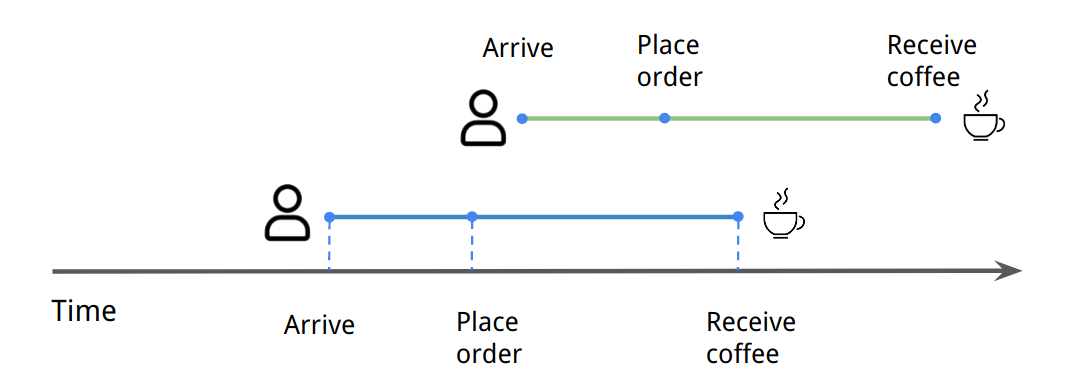
In the coffee shop simulation, we model the process of ordering and preparing a drink. Each customer orders n_cups of coffee. For simplicity, we model the number of cups only, and not the details of the order. There will be no caramel macchiato with chocolate drizzle available in our coffee shop! Most customers buy one or two cups of coffee, occasionally up to four.
We also sample the times between customer arrivals (interarrival) from an exponential distribution. This is a common choice as it assumes customers are arriving independently of each other. Below is an example using a mean interarrival time of 2 minutes with 20 customers.
import random
from functools import partial
import numpy as np
import matplotlib.pyplot as plt

def pick_n_cups():
    return random.choices(range(1, 5), [0.6, 0.25, 0.05, 0.05])[0]

def interarrival(mean):
    assert mean > 0
    return random.expovariate(1 / mean)

mean_delta = 2  # minutes
n_customers = 20
arrival_deltas = [interarrival(mean_delta) for _ in range(n_customers)]
n_cups = [pick_n_cups() for _ in range(n_customers)]
arrival_times = np.cumsum(arrival_deltas)
#collapse
plt.figure(figsize=(10, 4))
ax = plt.gca()
ax.bar(arrival_times, n_cups, width=0.2)
ax.set_yticks(range(1, 5))
ax.set_xlabel("Time [minutes]")
ax.set_ylabel("Number of cups")
ax.set_title(f"Arrival times with mean = {mean_delta} minutes");

We see that it takes about 40 minutes for 20 customers to arrive, as we would expect with a mean of 2 minutes.
Let's start with a simplified model where we only have barristas, so a customer can directly request coffee from them without going through checkout. Free coffee!
We use a Simpy Resource to model barristas. A resource is typically shared between multiple processes, and they queue to use it. A resource has a capacity - in this case this determines the number of barristas. Other types of resources are also available: for example, containers can be used to model a continuous quantity.
from collections import namedtuple

Order = namedtuple("Order", ["id", "n_cups"])

def time_per_cup(avg_time=2):
    return max(1, random.normalvariate(avg_time, 0.5))

def prepare_coffee(env, order, barrista):
    print(f"begin order {order.id}", round(env.now, 3))
    with barrista.request() as req:
        yield req  # wait until a barrista is available
        prepare_time = order.n_cups * time_per_cup()
        yield env.timeout(prepare_time)  # preparing coffee

    print(f"order {order.id} ready!", round(env.now, 3))

def generate_customers(env, barrista, mean_delta=2):
    i = 0
    while True:
        order = Order(i, pick_n_cups())
        yield env.timeout(interarrival(mean_delta))
        env.process(prepare_coffee(env, order, barrista))
        i += 1
Each order is a namedtuple, which contains the order id (so we can track it throughout the simulation), as well as the n_cups which impacts the time it takes to prepare the order. We assume the order prep time is linear with n_cups, with same variability determined by time_per_cup.
The simulation currently consists of two processes. The main process is prepare_coffee which models how a coffee is prepared. We first request the barrista resource, which means we wait until a barrista is available, and then prepare the order based on n_cups. When we exist the barrista.request() context, the barrista is released by the current process, and becomes available to fulfull other orders.
The generate_customers resource generates orders based a mean_delta value using the interarrival distribution we saw before.
random.seed(0)
env = simpy.Environment()
barrista = simpy.Resource(env, capacity=1)
env.process(generate_customers(env, barrista))
env.run(until=20)
Based on the simple run above, we see that a single barrista seems to be struggling with the flood of clients during the busy period. Let's refactor the simulation code so it is easier to track customer wait times.
We create a class CoffeeSimBase which implements the simulation logic. Inside the class, we keep referenences to the environment, the barrista resources, as well as a dictionary records which marks each time an order begins (+1), and is completed (-1). In this way, we can calculate the number of orders waiting at any one time by computing a cumulative sum over the records. We do not yet make any changes to the simulation logic discussed above.
ORDER_BEGIN = 1
ORDER_READY = -1

class CoffeeSimBase:
    """Base coffee simulation - with barristas only."""
    def __init__(self, env, n_barristas, to_log=False):
        self.env = env
        self.barrista = simpy.Resource(env, capacity=n_barristas)
        self.records = {}  # for saving data
        self.to_log = to_log

    def record_order_begin(self, order):
        begin_time = self.env.now
        self.records[begin_time] = ORDER_BEGIN
        if self.to_log: print(f"begin order {order.id}", round(self.env.now, 3))

    def record_order_ready(self, order):
        ready_time = self.env.now
        self.records[ready_time] = ORDER_READY
        if self.to_log: print(f"order {order.id} ready!", round(ready_time, 3))

    def request_barrista(self, order):
        with self.barrista.request() as req:
            yield req  # wait until a barrista is available
            prepare_time = order.n_cups * time_per_cup()
            yield self.env.timeout(prepare_time)

    def prepare_coffee(self, order):
        self.record_order_begin(order)
        yield self.env.process(self.request_barrista(order))
        self.record_order_ready(order)

    def generate_customers(self, mean_delta=2):
        i = 0
        while True:
            order = Order(i, pick_n_cups())
            yield self.env.timeout(interarrival(mean_delta))
            self.env.process(self.prepare_coffee(order))
            i += 1

    def run(self, mean_delta, until):
        self.env.process(self.generate_customers(mean_delta))
        self.env.run(until=until)

    @classmethod
    def from_new_env(cls, *args, **kwargs):
        env = simpy.Environment()
        return cls(env, *args, **kwargs)
coffee_sim = CoffeeSimBase.from_new_env(n_barristas=1, to_log=True)
coffee_sim.run(2, 20)
Below we add some helper functions to collect data from simulation runs and plot them.
#collapse
import pandas as pd
import seaborn as sns
from itertools import islice

def records2series(ledger):
    """Convert the coffee ledger into a series."""
    series = pd.Series(ledger).cumsum()
    assert series.min() >= 0
    return series

def simulate_many(sim_factory, mean_delta=2, until=60):
    while True:
        sim = sim_factory()
        sim.run(mean_delta=mean_delta, until=until)
        yield sim

def collect_records(sim_iterator, n=10):
    sim_recors = [sim.records for sim in islice(sim_iterator, n)]
    return [records2series(r) for r in sim_recors]

def lineplot_many(records, ax=None, **kwargs):
    ax = ax or plt.gca()
    for r in records:
        r.plot(ax=ax, color="steelblue", **kwargs)
    ax.set_xlabel("Time [minutes]")
    ax.set_ylabel("queue size")
    return ax
sim_one = partial(CoffeeSimBase.from_new_env, n_barristas=1)
sim_two = partial(CoffeeSimBase.from_new_env, n_barristas=2)
#collapse
records_one = collect_records(simulate_many(sim_one, until=90))
records_two = collect_records(simulate_many(sim_two, until=90))

fig, (ax0, ax1) = plt.subplots(nrows=1, ncols=2, figsize=(12, 4), sharey=True)
ax0 = lineplot_many(records_one, ax=ax0, alpha=0.8)
ax1 = lineplot_many(records_two, ax=ax1, alpha=0.8)
ax0.set_title("barristas=1")
ax1.set_title("barristas=2");

With one barrista, the queue size increases steadily over time, in some cases to more than 20 people after one hour.
With two barristas, the queue might occasionally get longer, but in most cases it is manageable.
Have a little patience
So far we have assumed that each customer has infinite patience and will wait until the end of time for their drink. In practice, a very long queue might discourage some customers. We are going to model two populations, customers who have near-infinite patience, and customers with relatively short patience, e.g. 5 minutes. If the latter group's order is not complete within this period, they will exit the queue.
To model this, we will use two Simpy features. The first is the ability to wait for multiple events to complete. The following will complete when either event a or b are processed:
res = yield event_a | event_b # wait for a or bAs expected, there is a related construct of waiting for both events a and b:
res = yield event_a & event_b # wait for a and bbut we do not use this in our simulation.
The second feature we need is the ability to interrupt a process, by triggering an interrupt exception. Once an interrupt is triggered, it is passed to the process generator - in our case request_barrista. So we need to modify it to handle the exception.
Here is an updated coffee simulation class:
T_IMPATIENT = 5
T_PATIENT = 1000

def get_patience(p_patient=0.7):
    """Some people have patience = 5 minutes, and
    others, nearly infinite patience."""
    return T_PATIENT if random.random() < p_patient else T_IMPATIENT

class CoffeeSimPatience(CoffeeSimBase):
    def __init__(self, env, n_barristas, to_log=False):
        super().__init__(env, n_barristas, to_log)
        self.orders_left = []

    def request_barrista(self, order):
        with self.barrista.request() as req:
            try:
                yield req  # wait until a barrista is available
                prepare_time = order.n_cups * time_per_cup()
                yield self.env.timeout(prepare_time)
            except simpy.Interrupt as i:
                return

    def record_order_left(self, order):
        """Keep track of orders where customer ran out of patience."""
        leave_time = self.env.now
        if self.to_log: print(f"leaving order {order.id} at", round(leave_time, 2))
        self.orders_left.append(order)

    def prepare_coffee(self, order):
        self.record_order_begin(order)
        patience = self.env.timeout(delay=get_patience())
        barrista_req = self.env.process(self.request_barrista(order))
        res = yield patience | barrista_req
        if barrista_req not in res:  # ran out of patience
            barrista_req.interrupt()
            self.record_order_left(order)
            return
        self.record_order_ready(order)


def collect_orders_counts(sim_iterator, n=10):
    """Collect tuples of (orders_lost, orders_complete)"""
    order_counts = []
    for sim in islice(sim_iterator, n):
        n_orders_lost = len(sim.orders_left)
        n_orders_complete = sum(1 for v in sim.records.values() if v == ORDER_BEGIN)
        order_counts.append((n_orders_lost, n_orders_complete))
    return order_counts
If the customer runs out of patience, the barrista_req process (which hasn't completed yet) is interrupted. We have modified the request_barrista generator function to handle this interrupt; in that case it will simply return, thereby releasing the barrista resource.
sim_patience_one = partial(CoffeeSimPatience.from_new_env, n_barristas=1)
sim_patience_two = partial(CoffeeSimPatience.from_new_env, n_barristas=2)

records_one = collect_orders_counts(simulate_many(sim_patience_one, until=90), n=50)
records_two = collect_orders_counts(simulate_many(sim_patience_two, until=90), n=50)

print("barristas=1", records_one[:5])
print("barristas=2", records_two[:5])
#collapse
records_one = (pd.DataFrame(records_one, columns=["orders_lost", "orders_complete"])
               .assign(barrista=1))
records_two = (pd.DataFrame(records_two, columns=["orders_lost", "orders_complete"])
               .assign(barrista=2))
records = pd.concat([records_one, records_two], ignore_index=True)
records["prop_lost"] = records["orders_lost"] / (records["orders_complete"] + records["orders_lost"])
ax = sns.boxplot(data=records, x="barrista", y="prop_lost")
ax.set_ylabel("Proportion of orders lost")
ax.set_xlabel("Number of barristas");
ax.set_title("Orders lost with barristas only");

Adding a cashier
Most busy coffee shops have a separate cashier accepting orders. This effectively creates two customer queues, one for placing an order, and one for collecting drinks from the barrista. For our final simulation, we will add a cashier.
Importantly, we are going to assume that a customer can only run out of patience while waiting in the cashier queue. Once they've paid, the assumption is they would wait to collect their drink.
def cashier_time(avg_time=1.5):
    """Time it takes cashier to collect order (in minutes)"""
    return max(0.5, random.normalvariate(avg_time, 0.5))

class CoffeeSimCashier(CoffeeSimPatience):
    def __init__(self, env, n_barristas, n_cashiers=1, to_log=False):
        super().__init__(env, n_barristas, to_log)
        self.cashier = simpy.Resource(env, capacity=n_cashiers)

    def request_cashier(self, order):
        with self.cashier.request() as req:
            try:
                yield req  # wait until a cashier is available
                yield self.env.timeout(cashier_time())
            except simpy.Interrupt as i:
                return

    def prepare_coffee(self, order):
        self.record_order_begin(order)
        patience = self.env.timeout(delay=get_patience())
        cashier_req = self.env.process(self.request_cashier(order))
        res = yield patience | cashier_req
        if cashier_req not in res:  # ran out of patience
            cashier_req.interrupt()
            self.record_order_left(order)
            return

        yield self.env.process(self.request_barrista(order))
        self.record_order_ready(order)
The request_cashier process is similar to the request_barrista, where it needs to handle the Interrupt when a customer leaves.
sim_patience_one = partial(CoffeeSimCashier.from_new_env, n_barristas=1)
sim_patience_two = partial(CoffeeSimCashier.from_new_env, n_barristas=2)

records_one = collect_orders_counts(simulate_many(sim_patience_one, until=90), n=100)
records_two = collect_orders_counts(simulate_many(sim_patience_two, until=90), n=100)
print("barristas=1", records_one[:5])
print("barristas=2", records_two[:5])
#collapse
records_one = (pd.DataFrame(records_one, columns=["orders_lost", "orders_complete"])
               .assign(barrista=1))
records_two = (pd.DataFrame(records_two, columns=["orders_lost", "orders_complete"])
               .assign(barrista=2))
records = pd.concat([records_one, records_two], ignore_index=True)
records["prop_lost"] = records["orders_lost"] / (records["orders_complete"] + records["orders_lost"])
ax = sns.boxplot(data=records, x="barrista", y="prop_lost")
ax.set_ylabel("Proportion of orders lost")
ax.set_xlabel("Number of barristas")
ax.set_title("Orders lost with cashier and barristas");

We see that the proportion of orders lost is significantly reduced when a cashier is introduced to the simulation. This is because we assumed a customer wouldn't leave once they've paid for their drink. It usually takes longer to prepare the drink rather than to pay for it, so customers are spending more time in the second queue, waiting for the barrista.
In practice, the reduction in orders lost is not as dramatic because a cashier typically wouldn't not let the barrista queue get too long. In fact, they might jump in and help out some of the barristas, speeding up the barrista queue, but slowing down the cashier queue. Still, having a dedicated cashier impacts the ordering dynamics.
Further exploration
There are many ways in which this simple model can be extended. One interesting idea is to model order mistakes. Even in the best of coffee shops, mistakes can occur, where there is a misunderstanding between the customer and the cashier / barrista about the order details. Even though these mistakes are typically rare, I've noticed they can cause a substantial disruption: often a discussion is needed to clarify the issue, and the order might be redone, introducing a significant delay into the system.
This issue could be modeled by a mixture distribution, where most drinks are prepared according to plan, but a small number of drinks take significantly longer to prepare. Furthermore, this delay can be modeled in both the cashier process and the barrista process.
We used discrete-event simulation to model a coffee shop. While the model is relatively simple, we discovered insights about the structure of the coffee shop queues as they relate to lost orders.
Simpy takes advantage of generators in Python to model rich process dynamics. This is because generators have a key ability to suspend execution and then resume at a later point. This has important applications in other areas such as asynchronous programming.